
860C or SW102 display
The open source firmware version for 860C and SW102 displays requires flashing the open source firmware onto them. More information can be found on the official project GitHub page.
In our offer, we have 860C and SW102 displays with the open source firmware already pre-installed, fully compatible with the OSF version for TSDZ8.
The programming kit
To update the firmware in TSDZ8 motor you need TSDZ8 J-Link V9 USB Programming Kit
Required files
Install the J-Flash application (JLink_Windows_V612a.exe) for the programmer.
Download the project file (tsdz8_jlink_XMC1302.jflash).
Get the HEX file with the open source firmware for TSDZ8 motor controller from the official GitHub project pages.
The TSDZ8 motor controller OSF firmware for 860C and SW102 displays is available here:
https://github.com/mstrens/OSF_860C
Download the archive by clicking Code -> Download ZIP. The HEX files are in the "files_to_flash" folder.
Connecting the programming kit to the TSDZ8 motor
Connect the 6PIN female plug from the programming kit to the 6PIN male speed sensor plug from the TSDZ8 motor. The motor should be disconnected from the power source (battery).

OSF installation using J-Flash
1. Connect the USB cable of the programming kit to the computer
2. Install J-Flash (JLink_Windows_V612a.exe).
3. Open J-flash and select the project file tsdz8_jlink_XMC1302.jflash.

4. As an optional step, you can back up the current firmware flashed in the motor controller. To do that, select Target -> Manual Programming -> Read back -> Entire Chip and save the file in the HEX format.

5. Next, open the HEX file with the open source firmware. As of now (01.06.26), the latest test version is OSF_TSDZ8_860C_SPIDER_3_V00_02.04_other_compilation.hex.
The HEX file can be opened by going to File -> Open data file

6. Go to Target -> Production Programming to flash the controller with the selected firmware file

If you encounter a prompt asking for the update, please select "No"

7. Disconnect the programming kit from the motor. Reconnect the power and check if the display powers on.
Torque Sensor Configuration
To ensure the torque sensor works correctly, you need to configure its settings properly.
1. Entering the Configuration Menu
To open the configuration menu, press and hold the "up", "down", and power buttons simultaneously.
2. Reading the Torque Sensor Value
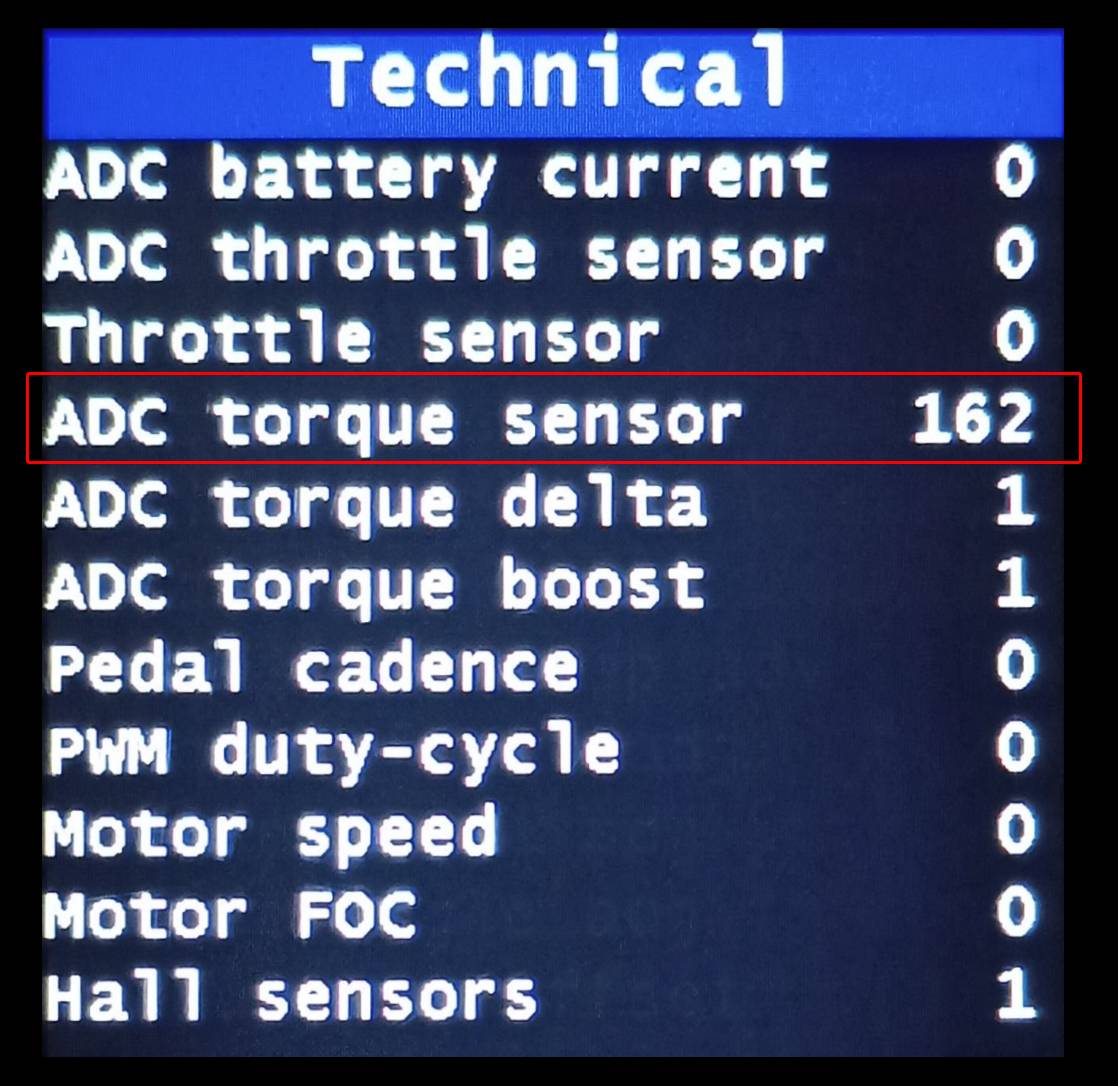
In the Technical section, locate the "ADC torque sensor" field, which displays the current reading from the torque sensor.
3. Determining the Offset Value
Rotate the cranks fully without any load on the motor, while observing the value in the "ADC torque sensor" field. The typical reading should be between 150 and 200.
4. Setting the Offset
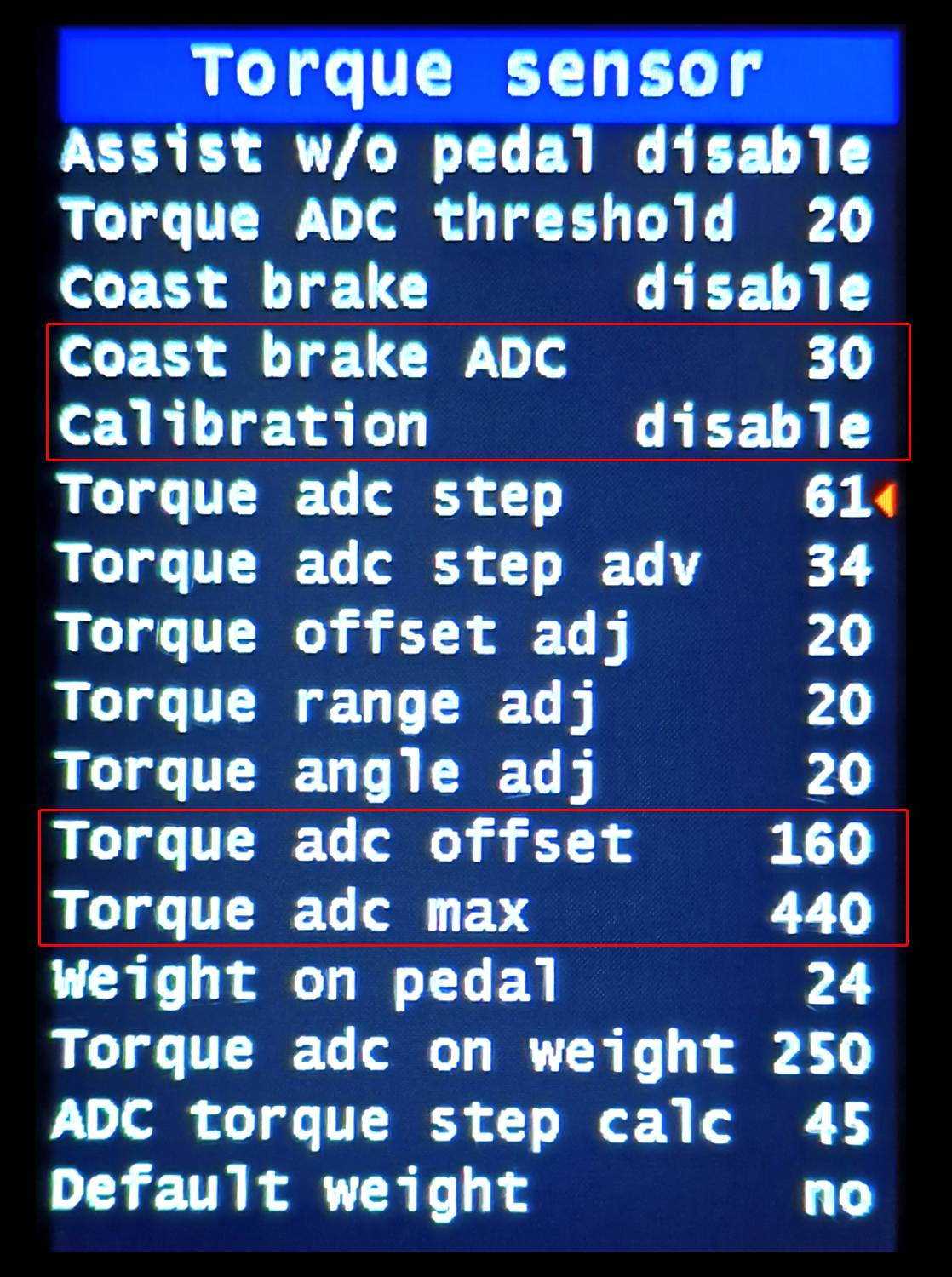
Add a small margin (e.g., 10) to the highest observed value. For example, if the maximum reading was 160, use 170. Enter this value in "Torque sensor -> Torque adc offset".
5. Determining the Maximum Sensor Value
To read the maximum sensor value, position the right crank horizontally, hold both brakes, and stand with your full weight on the right crank. Read the value from "Technical -> ADC torque sensor". It should be around 450 (±50).
6. Setting the Maximum Value
Enter the observed value in "Torque sensor -> Torque adc max".
7. Additional Settings
In the Torque sensor configuration menu, make sure the "Calibration" field is set to "disable". Also, check the "Coast brake ADC" field, which is used as the FOC multiplier and affects motor efficiency. The recommended value is around 30.
More information can be found on the official project page on GitHub and on the endless-sphere.com forum in the thread dedicated to open source firmware for TSDZ8 motors.
The author of the OSF version for TSDZ8 is mstrens. He deserves great thanks for the tremendous amount of work he put into porting the TSDZ2 version to the TSDZ8 controller. You can support the development of the project via PayPal.